%20(1).png?width=325&height=82&name=Logo%20Endorphine%20(1)%20(1).png)
1. Prerequisites
Before using the special pricing feature, you must:
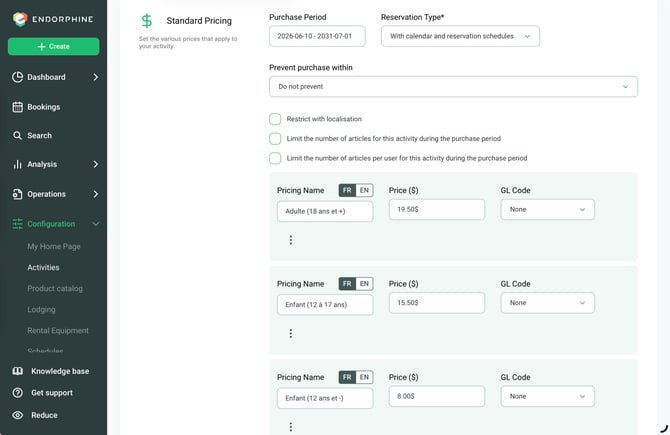
- Create your standard pricing for activities, season passes, or packages.
- Make sure that no special pricing periods overlap with existing time slots.
2. Special pricing details
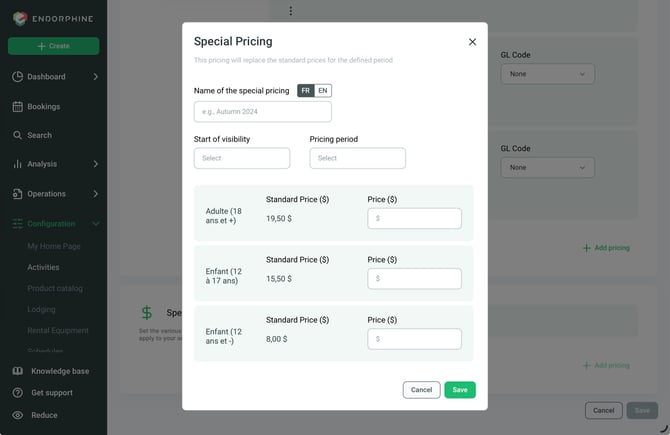
Special pricing name
Enter a descriptive name to identify this pricing internally.
Example: Peak season, Holiday pricing.
Note: This name will not be visible to customers.
3. Display start date
Configure the date and time when the pricing will become visible to customers.
Example:
Start: July 1, 2026, at 12:00 AM.
4. Pricing period
Define the period during which the special pricing will apply.
Enter the start and end dates.
Example:
- Start: July 1, 2026
- End: August 31, 2026
5. Pricing adjustments
Customize your predefined prices for this period. You can increase or decrease your prices.
Steps
- Select a predefined price (e.g., Adult day pass).
- Apply a percentage or fixed amount adjustment.
Examples:
- Increase: +20% (standard price of $10, adjusted to $12).
- Decrease: -10% (standard price of $10, adjusted to $9).
- Repeat for each price included in the period.
6. Price validation
Make sure that the periods defined for your special pricing do not overlap with other existing pricing periods.
Save your adjustments for each activity, season pass, or package.
Practical example
Context
You offer a daily activity (e.g., park access) and want to apply special pricing during peak season.
Standard pricing
- Adult access: $10
- Child access: $5
Special pricing (Peak season)
Dates: July 1, 2026 – August 31, 2026
Adjustment:
- Adult: +20% (adjusted price: $12)
- Child: +10% (adjusted price: $5.50)
Feature overview
Special pricing provides flexible price management based on seasons, events, or promotions.
Price adjustments can be applied without modifying standard pricing, allowing for streamlined pricing management.
Special pricing periods are displayed to customers only from the defined display start date.