%20(1).png?width=325&height=82&name=Logo%20Endorphine%20(1)%20(1).png)
Step 1: Access Lodging
- From the left-hand menu, click Configuration.
- Select Lodging.
Step 2: Select a lodging
Open the lodging for which you want to configure a minimum stay.
Step 3: Set the minimum stay duration
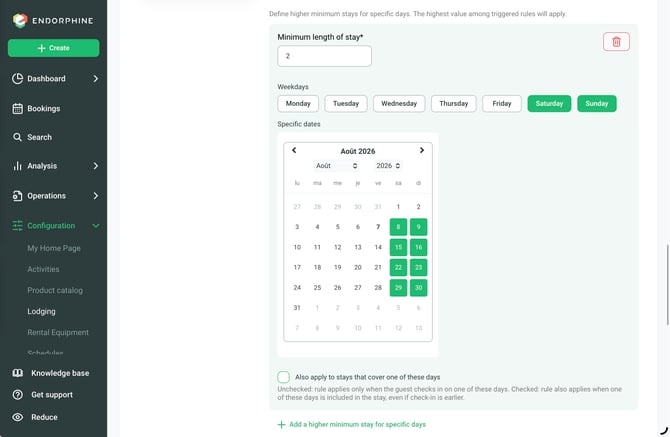
In the Configuration section, enter the minimum number of nights required for this lodging (for example, 2 nights).
Step 4: Select the applicable periods
Choose the days of the week when this rule should apply (for example, weekends).
You can also select specific dates or periods, such as holiday periods or seasonal dates.
Step 5: Save your changes
Click Save at the bottom of the page to save your changes.
The minimum stay requirement will now be applied to the selected days or periods.